6 Best DeWalt Drills (October 2026)
The best best DeWalt drills include the DeWalt DCD771C2 20V MAX XR Drill Driver Kit for first-time drill buyers, the DeWalt DCD777D1 20V MAX Drill Driver Set for regular home projects, and the DeWalt DCD996B 20V MAX XR Hammer Drill Driver (Tool Only) for varied masonry projects.
On this page (9 sections)
- Which is the best DeWalt drill for your work?
- How we chose these DeWalt drills
- How do you choose a DeWalt drill for your materials?
- Should you buy a kit or a tool-only DeWalt drill?
- Which drill features make a practical difference?
- How should you set up a DeWalt drill for the first job?
- Which mistakes cause poor drilling results?
- How do you care for the drill and batteries?
- Which DeWalt drill should you choose?
The best DeWalt drill for most home users is the DCD771C2 kit, because it includes the drill, 2 batteries, a charger and a storage bag. Choose the DCD777D1 for a brushless starter set, or a hammer drill when your projects include masonry.
Start with the work you need to finish, then check what you already own. A complete kit helps a first-time buyer, while a bare tool can make more sense when compatible batteries are already on the shelf.
If the branding leaves you unsure, our guide to DeWalt 20V MAX vs XR explains the labels.
Our picks at a glance
-
1
 Best for first-time drill buyers
DeWalt DCD771C2 20V MAX XR Drill Driver Kit
9.1/10 our score
See it on Amazon -
2
 Best for regular home projects
DeWalt DCD777D1 20V MAX Drill Driver Set
8.6/10 our score
See it on Amazon -
3
 Best for varied masonry projects
DeWalt DCD996B 20V MAX XR Hammer Drill Driver (Tool Only)
8.2/10 our score
See it on Amazon
- 4
 Check it
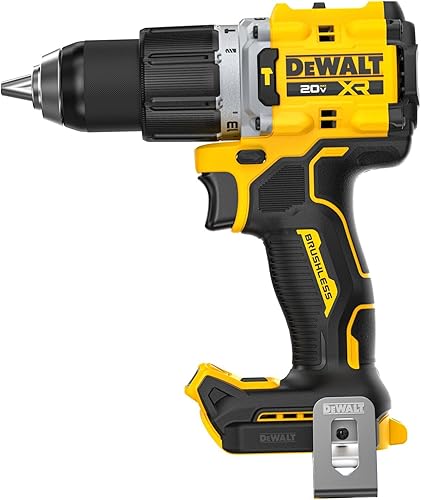
DeWalt DCD806B 20V MAX XR Hammer Drill (Tool Only)
Best for demanding mixed-material work - 5
 Check it
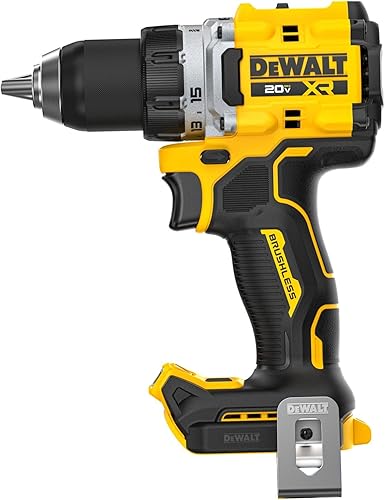
DeWalt DCD801B 20V MAX XR Drill Driver (Tool Only)
Best for existing battery owners - 6
 Check it
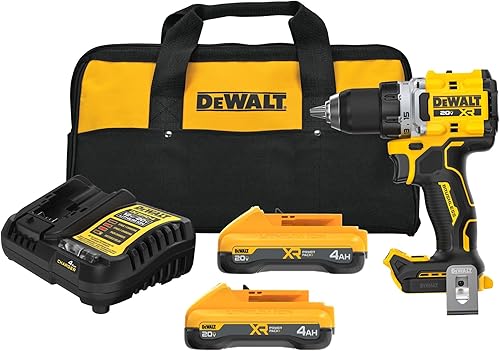
DeWalt DCD801QQ2 20V MAX XR Drill Driver Kit
Best for longer project days
Which is the best DeWalt drill for your work?
The DCD771C2 is the strongest all-around starting point here, while the other picks solve more specific needs. Choose among them by project type, battery needs and the controls you'll use, rather than buying the model with the most features.
DCD771C2: the best DeWalt drill kit for a first purchase
DeWalt DCD771C2 20V MAX XR Drill Driver Kit
- 2 batteries, charger and storage bag
- Two-speed transmission
- 1/2 in ratcheting chuck
- 300 UWO
A practical first kit for home repairs and small projects. Two batteries let you keep a spare ready, and the bag keeps the main parts together.
Pros
- Includes 2 batteries and charger
- Storage bag included
- Compact design for tight areas
Cons
- No hammer mode
- Less suited to buyers who already have batteries
Choose the DCD771C2 for occasional repairs, assembling furniture, installing hardware and starting small wood projects. Its main advantage is a complete package that leaves fewer separate parts to buy.
The motor delivers 300 UWO, and the transmission offers 0–450 and 0–1,500 rpm ranges. The lower range suits controlled fastening and work that needs more turning force, while the higher range suits many smaller drilling tasks.
A 1/2 in single-sleeve ratcheting chuck holds bits, and DeWalt designs the compact body for tight areas. Remember to allow room for the bit and your hand when working inside a cabinet.
The second battery is useful when a quick repair grows into several jobs. Keep it charged before starting, since an empty spare won't prevent a pause.
Skip this kit if you need hammer mode or already have compatible batteries and want a different drill body. If a brushless motor is your priority, our DCD777D1 review covers the next pick in more detail.
DCD777D1: a brushless set for regular DIY work
DeWalt DCD777D1 20V MAX Drill Driver Set
- Brushless motor
- 2Ah battery and charger included
- Two-speed transmission
- LED light with 20-second delay
A brushless starter set for buyers who use a drill regularly and can work with one battery. Its delayed LED shutoff helps when checking a hole or screw in a dim space.
Pros
- Brushless motor
- Battery and charger included
- LED stays on briefly after trigger release
Cons
- No hammer mode
- Only 1 battery included
Choose the DCD777D1 if your drill comes out regularly for shelves, repairs and wood projects. DeWalt says its brushless motor delivers more runtime than brushed motors, making it a useful step up for buyers who expect frequent use.
This set includes a 2Ah battery and charger, with a two-speed transmission for drilling and fastening. Its 340 UWO output is one part of the choice, but it shouldn't outweigh kit contents or task fit.
The LED stays on for 20 seconds after you release the trigger. That gives you time to check a screw head or hole inside a dim cabinet without keeping the bit turning.
One battery can be enough for short sessions with breaks for measuring and assembly. For a long sequence of holes or screws, plan charging time or a compatible spare.
Skip it if masonry work is essential or you want two batteries from the start. Our DCD777D1 and DCD771C2 comparison helps you weigh the motor choice against the different kit contents.
DCD996B: a hammer drill with more gear choices
DeWalt DCD996B 20V MAX XR Hammer Drill Driver (Tool Only)
- Brushless motor
- Three-speed transmission
- Hammer drill mode
- 360-degree side handle
A hammer drill for buyers who want three gear choices and an included side handle. It makes the most sense when compatible batteries and a charger are already available.
Pros
- Hammer drill mode
- Three speeds
- Side handle included
Cons
- Battery and charger sold separately
- 4 lb tool weight
Choose the DCD996B when your projects call for hammer drilling and you want three gear choices. It suits a buyer with compatible batteries who wants to move between drilling tasks without making every adjustment through the trigger alone.
Its heavy-duty metal ratcheting chuck has carbide inserts for bit grip. The included 360-degree side handle gives you another grip point when drilling calls for firm two-handed control.
The three-mode LED includes a spotlight mode with a 20-minute shutoff. Arrange separate work lighting too if your hands or the workpiece block the drill's light.
At 4 lb, this tool deserves more thought if your work involves repeated overhead holes. Consider working position and session length rather than choosing a hammer drill solely for its broader task range.
Skip it for mostly furniture assembly or light fastening, where its extra mode offers little help. Batteries and charger are sold separately, so it also needs a fuller shopping plan if you're starting without DeWalt equipment.
DCD806B: hammer drilling with added rotation control
DeWalt DCD806B 20V MAX XR Hammer Drill (Tool Only)
- Brushless hammer drill
- Two-speed transmission
- ANTI-ROTATION System
- Three-position LED
Choose this hammer drill when you need masonry capability and want a system that shuts the tool down if rotational motion becomes excessive. Batteries and charger are separate.
Pros
- ANTI-ROTATION System
- Adjustable work light
- Metal ratcheting chuck
Cons
- Battery and charger sold separately
- Hammer mode adds little for screw-only projects
Choose the DCD806B for projects that combine ordinary drilling with masonry work, especially if rotation control is a priority. Its ANTI-ROTATION System senses excessive rotational motion and shuts the tool down, with a red indicator showing when it engages.
That feature supports control but doesn't replace a firm grip, a secured workpiece or correct drilling technique. A bit can bind as it breaks through material or catches inside a hole.
The transmission has 0–650 and 0–2,000 rpm no-load ranges, with a variable-speed trigger. Its adjustable three-position LED provides 70 lumens and shuts off automatically.
This is a bare tool with a belt hook, so you need compatible batteries and a charger separately. It makes the clearest sense when those parts are already covered.
Skip it if your work stays with wood, metal and screws, since the DCD801B offers a drill-driver route with the same named rotation-control feature. Choose the DCD996B instead if having three gears and an included side handle matters more to your work.
DCD801B: a drill-driver upgrade for battery owners
DeWalt DCD801B 20V MAX XR Drill Driver (Tool Only)
- Brushless drill driver
- Two-speed transmission
- ANTI-ROTATION System
- Three-position LED
A bare drill driver for buyers who already have compatible batteries and want control features for demanding drilling. Choose another model if hammer drilling is part of the plan.
Pros
- Brushless motor
- ANTI-ROTATION System
- Adjustable work light
Cons
- Battery and charger sold separately
- No hammer mode
Choose the DCD801B if you already own compatible batteries and want a brushless drill driver for demanding drilling and fastening. It focuses on those jobs without adding hammer mode.
The ANTI-ROTATION System shuts the tool down when it detects excessive rotational motion. Its metal ratcheting chuck supports bit retention, while the adjustable LED helps you place the bit in dim areas.
The two-speed transmission and variable trigger let you select a range, then ease into the cut. Controlled starts are useful when a bit might wander or a driver bit needs to stay seated in a screw.
This package includes the tool and a belt hook, with batteries and charger sold separately. Check that your existing packs are compatible and in useful condition before treating a bare tool as a complete solution.
Skip it if masonry holes are a regular need or you have no battery equipment yet. The kit below is the more direct route if you want this drill driver and need batteries too.
DCD801QQ2: a complete kit for longer work sessions
DeWalt DCD801QQ2 20V MAX XR Drill Driver Kit
- Brushless drill driver
- 2 POWERPACK 4Ah batteries
- Charger included
- ANTI-ROTATION System
The DCD801 kit suits buyers starting a larger run of drilling and fastening work. Its two batteries let you rotate packs instead of relying on a single battery.
Pros
- 2 POWERPACK 4Ah batteries
- Charger included
- Brushless motor
Cons
- No hammer mode
- Extra batteries may be unnecessary for existing owners
Choose the DCD801QQ2 when you want the DCD801 drill driver and need a battery setup for longer projects. It includes 2 POWERPACK 4Ah batteries and a charger, letting you rotate packs during a day of drilling and fastening.
That arrangement suits work such as building several storage units or completing a run of shelves. It gives you a spare to prepare before starting, though charging speed and workload still affect whether you can work without a pause.
The brushless drill driver includes rotation control, a metal ratcheting chuck and an adjustable work light. The reason to choose this package over the bare tool is the battery equipment, rather than a different drilling role.
It remains a drill driver without hammer mode. Don't choose it expecting the kit contents to change which materials need a hammer drill.
Skip this package if your compatible batteries already cover your projects or your drill use is brief and infrequent. For a few small repairs, a simpler starter set may meet the need with fewer battery parts to store.
How we chose these DeWalt drills
We put complete home-use fit ahead of feature count, which is why the DCD771C2 leads this roundup. We compared tool type, motor, controls and included equipment to separate first-purchase kits from upgrades for existing battery owners.
A lower-ranked model can still be the right choice for a specific project. The hammer drills serve a different need from the starter kits, and the bare tools make more sense when you already have a battery setup.
We haven't used broad power or holes-per-charge claims to decide between these picks. Those figures need matching conditions to make a useful comparison.
How do you choose a DeWalt drill for your materials?
Choose a drill driver for wood, metal and screws, or a hammer drill when your projects also require suitable masonry drilling. The material and hole size matter more than the number of features on the box.
Wood, furniture and hardware
A drill driver is the right starting point for shelf brackets, cabinet hardware and pilot holes. Use a wood bit for holes and a driver bit that matches the screw head for fastening.
Think about access before choosing bits. A long bit may reach through a thick workpiece, but it also needs more clearance inside a cabinet or between framing members.
For furniture assembly, gentle trigger control and the clutch matter more than maximum speed. Start with a low clutch setting and increase it only until the screw seats properly.
Metal and mixed repair work
Metal drilling needs a suitable bit, a secured workpiece and speed matched to the bit and material. A center punch can help keep a bit from wandering on a smooth surface.
Don't hold a loose metal strip in your hand while drilling. If the bit catches, the workpiece can turn sharply.
For larger holes, check the tool manual and the bit maker's guidance. A chuck accepting a bit doesn't mean every hole size is suitable for the drill.
Brick, block and concrete
Hammer mode adds repeated blows along the bit's direction of travel for suitable masonry work. Use a masonry bit and the mode called for by the material, bit and tool instructions.
Hard concrete, repeated large holes or reinforced material may call for a rotary hammer instead. Don't assume either hammer drill here replaces every masonry tool.
Turn hammer mode off for wood, metal and screw fastening. Our guide to drill drivers versus hammer drills explains when the extra mode helps.
Should you buy a kit or a tool-only DeWalt drill?
Buy a kit when you need the battery equipment, and a bare tool when compatible batteries and a charger are already available. Compare the complete setup you'll use, including any missing parts.
Count usable batteries, not just batteries you own
A compatible pack with poor runtime may not cover the work you have planned. Check the condition of your existing equipment before choosing a bare tool.
One battery often suits short jobs with natural breaks. Two are useful when you want a charged spare, though a second pack doesn't guarantee that charging will keep pace with heavy use.
Match capacity to the work session
Amp-hours describe battery capacity, not a drill's torque. A higher-capacity battery can store more energy within a comparable battery system, but runtime also depends on material, bit size and how hard the tool works.
Consider balance as well as capacity. Battery size can change how a drill feels during overhead work or when reaching into a cabinet.
Choose a platform deliberately
Confirm compatibility with the exact battery and charger models you intend to use. Brand name alone isn't enough to establish that different battery families fit together.
If you mainly need furniture assembly and small repairs, consider whether a smaller platform would fit your work. Our 12V vs 20V cordless drill guide explains that decision before you commit to batteries.
Which drill features make a practical difference?
Prioritize control, access and the right speed range before chasing the largest power figure. A drill that fits the work area and holds the correct bit is more useful than extra features you rarely use.
Brushless motors and frequency of use
Brushless is a sensible preference for regular use, especially when the kit also meets your battery needs. For occasional repairs, a complete starter package may matter more than motor type.
Read our guide to whether a brushless cordless drill is worth it if this is the main choice separating your finalists. Compare whole packages rather than paying attention to the motor alone.
Gear ranges and trigger control
The gear selector changes the drill's speed range, while the trigger controls speed within that range. Lower gears generally suit larger bits and work needing more turning force; higher gears suit many smaller holes.
Let the tool stop before changing gears, and follow its manual. If a bit stalls repeatedly, check the gear, bit condition and suitability of the task instead of pressing harder.
Chuck size and working clearance
Chuck size describes the bit shank it can accept, rather than the largest hole the drill can make. The bit, material and tool's capacity limits still govern the job.
Measure tight spaces with the bit fitted. The drill body might fit between two surfaces while leaving no room to align the bit or pull it out of a finished hole.
For a broader explanation of tool types and controls, see our cordless drill buying guide.
How should you set up a DeWalt drill for the first job?
Start with the correct bit, a secured workpiece and a low-speed start. Good setup prevents common problems such as wandering holes, slipping driver bits and damaged screw heads.
Before fitting a bit
Remove the battery before changing bits or making adjustments that could put your hand near the chuck. Check the bit for damage, then seat its shank centrally and tighten the chuck as the manual directs.
Use a driver bit that fully fits the screw recess. A close-looking bit can still slip and damage the fastener.
Clamp loose work and wear eye protection. Before drilling a wall, locate likely pipes and cables and choose an anchor suited to the wall material.
Start the hole or screw carefully
Mark the location and keep the drill aligned with the intended hole. Begin slowly so the bit can establish its position before you increase speed.
For screws, start with a low clutch setting and raise it in small steps. Stop when the head reaches the depth the joint needs, especially in soft wood or furniture panels.
Drill pilot holes where the screw or material calls for them. A pilot hole can help prevent splitting near an edge and reduce the force needed to drive the screw.
Finish without forcing the tool
Ease pressure as a drill bit approaches the far side of a workpiece. Support the exit face with scrap wood when a clean edge matters.
If the bit binds, release the trigger and make the area safe before freeing it. Don't keep squeezing the trigger against a stalled bit.
Our guide to using a cordless drill walks through these controls and first-job steps in more detail.
Which mistakes cause poor drilling results?
The most common mistakes are using the wrong bit, choosing the wrong mode and forcing a stalled cut. Fix those causes before assuming you need a more powerful drill.
- Using one setting for every task: Match the gear, mode and clutch to drilling or fastening.
- Driving screws at full trigger: Start slowly and keep the bit seated to reduce slipping.
- Leaving hammer mode on: Switch to the proper mode for wood, metal or screws.
- Using dull or damaged bits: Replace them rather than compensating with more pressure.
- Ignoring a loose workpiece: Clamp it so a catching bit can't spin the material.
- Expecting rotation control to manage every bind: Keep a secure grip and follow the tool's instructions.
Repeated stalling is a reason to stop and check the setup. A different bit, a smaller hole or a tool better suited to the task may be the answer.
How do you care for the drill and batteries?
Keep vents clear, bits serviceable and batteries away from excess heat. Simple care helps the tool stay ready without adding much work after a project.
Remove the battery before cleaning, and wipe dust from the outside with a dry cloth or soft brush. Keep liquid out of the tool and follow the manual for any chuck care.
Don't pack a hot drill tightly into a bag immediately after hard use. Let the tool and battery cool in a dry place, and follow the charger's instructions if charging pauses because of temperature.
Store batteries where their terminals can't touch loose screws or other metal objects. Stop using a battery that is damaged, swollen or leaking, and follow local guidance for proper disposal.
Before the next project, check that the charger, battery and bits are ready. Charging a spare and replacing a worn driver bit can prevent an avoidable break halfway through a job.
Which DeWalt drill should you choose?
Choose the best DeWalt drill for the next project you actually plan to finish. Decide whether you need masonry capability, then choose the package that fills the gaps in your battery setup.
- First drill for routine home jobs: Choose the DCD771C2 for its complete starter package.
- Regular DIY with a brushless preference: Choose the DCD777D1 if one included battery suits your sessions.
- Hammer drilling with three gear choices: Choose the DCD996B.
- Hammer drilling with rotation control: Choose the DCD806B.
- Drill-driver upgrade with batteries already covered: Choose the DCD801B.
- DCD801 drill driver plus a fresh battery setup: Choose the DCD801QQ2.
Before ordering, write down your main material, largest planned hole and available batteries. If you're still deciding on the brand, our DeWalt vs Milwaukee drill guide is the next useful comparison.
Our top 3 picks at a glance
-
1
Best for first-time drill buyers
DeWalt DCD771C2 20V MAX XR Drill Driver Kit
9.1/10 our score
See it on Amazon -
2
Best for regular home projects
DeWalt DCD777D1 20V MAX Drill Driver Set
8.6/10 our score
See it on Amazon -
3
Best for varied masonry projects
DeWalt DCD996B 20V MAX XR Hammer Drill Driver (Tool Only)
8.2/10 our score
See it on Amazon
Frequently asked questions
Which DeWalt drill is best for most homeowners?
The DCD771C2 is the best starting point here for most homeowners who need a complete kit. It includes 2 batteries, a charger and a storage bag for routine drilling and fastening.
Choose the DCD777D1 if a brushless motor matters more than having a second battery included.
Should you choose a DeWalt drill driver or hammer drill?
Choose a drill driver for wood, metal and screw fastening, or a hammer drill for projects that also involve suitable masonry. Hammer mode needs a masonry bit and should stay off for other materials.
Our guide to drill drivers and hammer drills explains which jobs suit each type.
Is the DeWalt DCD777D1 brushless?
The DCD777D1 has a brushless motor, which DeWalt says delivers more runtime than a brushed motor. Its set includes a 2Ah battery and charger, making it a useful starting point for regular DIY work.
Buyers planning long sessions should consider whether they also need a spare battery.
Do DeWalt tool-only drills include batteries?
The DCD996B, DCD806B and DCD801B do not include batteries or chargers. Buy one of these bare tools when you already have compatible parts or plan to get them separately.
Before ordering, confirm compatibility with your exact battery and charger models rather than relying on the DeWalt name alone.


