Drill Driver vs Hammer Drill: Which Fits Home Jobs? (October 2026)
For a drill driver vs hammer drill choice, pick a drill driver for wood, metal and household screws. Choose a hammer drill for small masonry holes within its capacity, with hammer mode off for ordinary drilling and fastening.
On this page (11 sections)
- Drill driver vs hammer drill: what is the difference?
- Which tool suits your actual home projects?
- Who should buy the DeWalt DCD777D1 drill driver set?
- Which DeWalt hammer drill fits your work?
- What should you check before buying either tool?
- How do you set up a drill driver or hammer drill?
- Can a hammer drill handle concrete anchor holes?
- Which mistakes cause poor results or tool damage?
- How do you care for either type of drill?
- Which one should you choose for home jobs?
- Sources
Choose a drill driver for household screws, wood and metal; choose a hammer drill when small masonry holes are part of your plans. The drill driver vs hammer drill decision starts with what you'll drill, rather than which tool sounds more powerful.
A hammer drill can cover ordinary drilling with hammer action switched off. Its extra mode earns its place when you're making suitable anchor holes in brick, block or concrete.
For furniture assembly and routine repairs, the DeWalt DCD777D1 set is the clearest starting point here. The DCD806B and compact DCD799B suit buyers with a real masonry task and a compatible battery setup.
 Best for first-time drill buyers
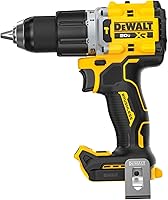
DeWalt DCD777D1 20V MAX Drill Driver Set
 Best for regular masonry projects
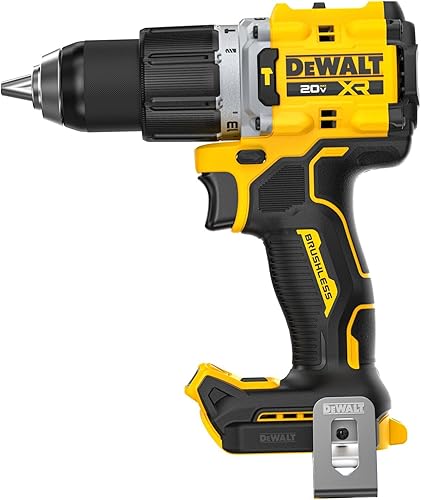
DeWalt DCD806B 20V MAX XR Hammer Drill (Tool Only)
Drill driver vs hammer drill: what is the difference?
A drill driver rotates the bit, while a hammer drill can add rapid forward taps as the bit turns. Those taps help a masonry bit break into hard material; they don't help you drive a cabinet screw.
A drill driver's clutch limits turning force when fastening. Standard drill mode lets the tool keep turning to bore a hole, so it isn't the setting to rely on for protecting small screws.
Hammer action works along the bit's length. An impact driver's impacts act around the direction of rotation, which is why the 2 tools serve different jobs.
Drill driver vs hammer drill: does hammer mode replace drill mode?
Hammer mode is an extra setting, not a replacement for normal drilling. Keep it off for wood, metal and screws, and use it only with a suitable masonry bit and material.
Tile, glass and other brittle surfaces need their own bits and methods. Don't assume that every hard wall surface should receive hammer action, especially when a tile face covers masonry underneath.
A rotary hammer is another tool category. It generally makes more sense for larger or deeper concrete holes, so buying a cordless hammer drill doesn't cover every masonry job.
Which tool suits your actual home projects?
A drill driver suits most indoor assembly and repair work; a hammer drill suits a home where masonry fixings are a recurring task. Think about your next few projects before choosing.
| Your main jobs | Better starting point | Reason |
|---|---|---|
| Furniture assembly and cabinet hardware | Drill driver | Controlled screw driving and pilot holes matter most |
| Shelves fixed to wood studs | Drill driver | The work calls for drilling and fastening without hammer action |
| Occasional holes in metal brackets | Drill driver | A suitable metal bit and standard drill mode do the job |
| Repeated small anchor holes in brick or concrete | Hammer drill | Hammer action helps a suitable masonry bit cut |
| Large or deep holes in dense concrete | Assess a rotary hammer | The hole may exceed a compact hammer drill's practical scope |
| Long screws and repeated heavy fastening | Consider an impact driver alongside a drill | Fastening demands differ from drilling demands |
Check the wall material before deciding that hanging a shelf requires a hammer drill. Drywall over wood studs is a different job from a solid brick wall, and the anchor must suit the wall.
Read our guide to what a drill driver does if you're choosing your first one. For a broader view of tool types and home projects, start with our cordless drills for home use guide.
Who should buy the DeWalt DCD777D1 drill driver set?
The DCD777D1 suits a first cordless drill setup for furniture, repairs and holes in wood or metal. Its included battery and charger remove the need to assemble a separate power setup.
It has a brushless motor, a 2-speed transmission and a 1/2 in ratcheting chuck. DeWalt describes the design as compact and lightweight, which suits work around cabinets and other restricted areas.
The LED stays on for 20 seconds after you release the trigger. That gives you light while checking a screw head or lining up the next hole in a dim corner.
Skip it as your only drill if regular masonry holes are already on your task list. It has no hammer mode, so it doesn't solve the main reason to choose a hammer drill.
Also check what you already own before buying another kit. A compatible battery platform can change which package offers the most useful starting point.
Which DeWalt hammer drill fits your work?
Choose the DCD806B for regular masonry projects, or the DCD799B when restricted access is the deciding factor. Both are tool-only models, with batteries and chargers sold separately.
DCD806B: for recurring masonry jobs
The DCD806B suits buyers who expect to make masonry holes regularly and want more control features. Its ANTI-ROTATION System senses excessive tool rotation and shuts the tool down, with a red indicator when the system engages.
That feature matters because a bit that catches can twist the drill in your hands. It supports safe operation, but you still need the grip, stance and any handle setup required by the manual.
Its 2 speed ranges are 0–650 and 0–2,000 rpm, controlled through a variable speed trigger. The metal ratcheting chuck holds bits, while an adjustable 3-position LED helps light the work.
Skip this choice if your projects stop at furniture and small wood repairs. Those jobs give you little reason to choose it for its hammer capability or anti-rotation feature.
DCD799B: for masonry work with limited clearance
The DCD799B suits a masonry task where the drill's head length makes access difficult. Its 6.49 in tool head is the useful measurement here, rather than a promise that the complete setup fits every corner.
Allow space for the bit sticking out, the battery below the grip and your hands. You also need room to keep the bit straight; reaching the hole at an angle isn't a workable substitute.
It has an on-tool LED and a maximum speed of 1,650 rpm. Choose it because access matters to your project, rather than treating maximum speed as a complete measure of drilling ability.
Skip it if the job needs a larger concrete-drilling tool. A compact head helps with reach, but it doesn't change the hole size, material or drilling capacity you must match.
Our guide to whether you need a hammer drill at home can help you decide whether your planned work justifies owning one.
What should you check before buying either tool?
Check the complete setup, working space and required hole size before comparing extra features. The right drill still needs compatible power, suitable bits and enough room to operate.
Start with the battery package. A tool-only model makes sense if you already have compatible batteries and a charger, but otherwise those are separate items you need before starting.
Next, check the bits and accessories for the job. A 1/2 in chuck describes the shank it can hold, not a universal limit or promise for hole diameter in every material.
Don't rank these tools by weight figures without knowing whether each figure includes a battery. The battery you fit changes the weight and balance you hold during the job.
For screws, consider the amount of fastening ahead. If you're building with many long screws, our drill vs impact driver guide explains when a second tool is more useful than hammer mode.
For help sorting chuck size, battery voltage and other features, see how to choose a cordless drill.
How do you set up a drill driver or hammer drill?
Choose the bit and mode first, then set speed and fastening control for the material. Remove the battery before fitting a bit or making adjustments that could put your hands near moving parts.
- Identify the material. Choose a wood, metal or masonry bit that suits both the surface and the intended hole.
- Secure the bit. Seat it straight in the chuck and tighten it as the manual directs.
- Select the mode. Use driver mode for screws if fitted, drill mode for ordinary holes and hammer mode for suitable masonry.
- Choose the gear. Lower gear generally suits greater turning force; higher gear suits faster drilling with appropriate smaller bits.
- Start slowly. Let the bit establish its position before increasing speed.
- Stop to change settings. Let the tool come to rest before changing gears or modes, following its instructions.
How should you set the clutch for screws?
Start with a low clutch setting and increase it until the screw seats correctly. The numbered settings aren't a shared torque scale across different drills.
Practice on an offcut of the same material when possible. Use a driver bit that fits the screw head closely, keep it aligned and ease off the trigger as the head approaches the surface.
For wood that may split, make a suitable pilot hole. Don't use extra force to compensate for a worn bit or a screw that's wrong for the material.
Our guide to how to use a cordless drill covers the basic controls and steps in more detail.
Can a hammer drill handle concrete anchor holes?
A hammer drill can suit small concrete anchor holes when the tool, bit and anchor instructions allow the required diameter and depth. Dense concrete and larger holes may call for a rotary hammer instead.
Choose the anchor before drilling. Its instructions determine the hole size, depth and cleaning method, so guessing the bit size can leave a fixing that won't hold correctly.
Check for cables, pipes and other hidden services before making a wall hole. A detector alone doesn't establish a safe path; get qualified help if you can't confirm where it's safe to drill.
Use suitable eye, hearing and dust protection, with dust control appropriate to the task. Concrete drilling creates fine dust, so plan for collection rather than blowing debris around the room.
Apply steady pressure without leaning your body weight into the drill. If progress stops, withdraw the bit as directed to clear debris and assess the cause instead of pushing harder.
Stop if the bit binds, the drill overheats or you hit something unexpected. For more on the tool's limits, see whether a cordless drill can drill into concrete.
Which mistakes cause poor results or tool damage?
The biggest mistakes are using the wrong mode, forcing a dull bit and ignoring the fixing instructions. More power doesn't correct a poor setup.
- Leaving hammer mode on: This adds unwanted impacts when drilling wood or metal and is unsuitable for screw driving.
- Using maximum speed for every hole: Large bits and metal drilling often need lower speeds; follow the bit maker's guidance.
- Holding small workpieces by hand: Clamp the work so a catching bit can't spin it into your fingers.
- Pushing a stalled drill: Release the trigger and investigate the cause rather than holding it under load.
- Drilling without a depth plan: An unnecessarily deep hole can reach hidden services or break through the far side.
- Changing direction while the bit turns: Let the tool stop before selecting forward or reverse.
Keep the bit square to the work unless the task calls for a planned angle. A crooked hole can keep a screw from seating or stop an anchor from fitting as intended.
How do you care for either type of drill?
Keep the chuck, vents and bits clean and dry, and store the battery according to its instructions. Basic care matters more than leaving a tool ready to run with a bit installed.
Remove the battery before cleaning, checking the chuck or changing accessories. Brush or wipe away loose debris without pushing it into the motor vents.
Inspect bits for dull edges, bent shanks and damage. Replace worn driver bits when they no longer fit screw heads firmly, since slipping damages both the bit and fastener.
Let hot bits cool before handling them. If the drill or battery becomes unusually hot, stop work and follow the manual's cooling guidance.
Store the drill securely with the bit removed, and keep batteries away from loose metal objects. Use the compatible charger and follow the battery instructions for storage temperature and charging.
Which one should you choose for home jobs?
For the drill driver vs hammer drill decision, buy for the work you can name now. A future masonry project matters less than a clear need for drilling and fastening today.
Choose the DCD777D1 set if you're starting with furniture, household repairs and wood or metal holes. Its complete power setup makes it the most direct starting choice among these 3 tools.
Choose the DCD806B when small masonry holes will be regular work and you value its anti-rotation shutoff feature. Choose the DCD799B when access is the main constraint and you've measured room for the whole setup.
Borrow or rent a suitable tool for an isolated masonry job, and assess a rotary hammer for demanding concrete work. If your next decision is about driving lots of screws, use our drill vs impact driver comparison to choose the right companion tool.
Sources
DeWalt's model information covers the drill driver set and XR hammer drill discussed here.
Frequently asked questions
Can a drill driver drill into concrete?
A drill driver can sometimes make small holes in softer masonry with a suitable bit, but dense concrete is a poor reason to choose one. A hammer drill is generally more suitable for small concrete anchor holes, while larger or deeper holes may require a rotary hammer.
Can you use a hammer drill as a regular drill?
Yes, use standard drilling mode with hammer action switched off for wood and metal. For screws, select driver mode and a suitable clutch setting if fitted.
Match the bit, speed and mode to the task, and stop before a screw head sinks too far into the material.
Should I buy a drill driver or hammer drill for home use?
Choose a drill driver for furniture assembly, household repairs and holes in wood or metal. Choose a hammer drill when small masonry holes are a recurring need.
If you only have one masonry project, compare borrowing or renting a suitable tool with buying one you'll rarely use.
Do hammer drills need special bits?
Hammer mode needs a masonry bit approved for that action and the material you're drilling. Check the bit shank and chuck compatibility, too: SDS bits generally belong in matching rotary hammer holders.
For ordinary wood or metal drilling, switch hammer mode off and use the appropriate standard bit.
Is a hammer drill the same as an impact driver?
No, a hammer drill adds forward hammering action for masonry, while an impact driver adds rotational impacts for driving fasteners. Their bit holders and main jobs also differ.
Our drill vs impact driver guide explains which tool makes sense for pilot holes, screws and larger fastening projects.