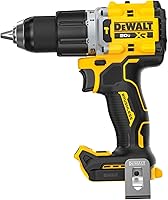
What Is a Drill Driver?
A drill driver is a corded or cordless tool for drilling holes and driving screws. Its chuck grips interchangeable bits, while an adjustable clutch helps control fastening force.
On this page (10 sections)
- What is a drill driver used for?
- How do the chuck, clutch, and speeds work?
- Which drill driver suits your projects?
- How is a drill driver different from an impact driver?
- Do you need a hammer drill instead?
- Which bits and upgrades are worth buying?
- How do you set up a drill driver?
- Which mistakes cause poor results?
- How should you choose and care for a drill driver?
- What is a drill driver's best role in your toolkit?
A drill driver is a corded or cordless tool that drills holes and drives screws using interchangeable bits. An adjustable chuck grips the bit, and a clutch helps limit turning force during fastening.
If you're asking what a drill driver is because you need your first home tool, it's a practical starting point. It can drill a pilot hole, install a shelf bracket, and assemble furniture, provided you choose the right bit and settings.
What is a drill driver used for?
A drill driver handles ordinary drilling and screw driving in materials such as wood, plastic, and metal. The bit determines what it cuts or turns.
Use a drill bit to make a hole, then swap to a driver bit to install a screw. For wood near an edge, a suitable pilot hole can reduce splitting and make the screw easier to drive.
For furniture assembly, start with a low clutch setting and finish delicate fasteners by hand if needed. Particleboard and small fittings are easy to damage with too much force.
A drill driver won't replace every drilling tool. Large holes, repeated heavy fastening, and concrete may need a different tool or accessory.
How do the chuck, clutch, and speeds work?
The chuck holds the bit, the clutch controls fastening force, and the speed selector chooses a gear range. The trigger starts rotation, while the direction switch selects forward or reverse.
What does a drill driver's clutch do?
An adjustable clutch limits how much turning force reaches a screw before the clutch slips. Start low on scrap material, then increase the setting until the screw reaches the depth you want.
The numbers aren't standard torque values across different drills. A setting that works on one tool may behave differently on another.
Drill mode typically bypasses the fastening limit. Use it for holes, but return to a clutch setting before driving small screws.
Which speed should you use?
Use the lower gear for controlled fastening and larger bits that require slower rotation. The higher gear suits many smaller drilling jobs, with the exact speed depending on the material and bit.
A variable-speed trigger lets you start gently within either range. Stop the motor before changing gears, and follow the bit's speed guidance rather than assuming faster always cuts better.
Which drill driver suits your projects?
Choose a complete kit for a first tool, a brushless option for frequent use, or a tool-only model when you already have compatible batteries. Match the package to your work before comparing extra features.
DeWalt DCD771C2: for a first household kit
The DCD771C2 suits someone starting from scratch who needs a drill for repairs, furniture, and basic wood projects. Its kit includes 2 batteries, a charger, and a storage bag, so you can keep a spare battery ready.
Its low range runs from 0–450 rpm, while the high range reaches 1,500 rpm. The single-sleeve ratcheting chuck grips bits as you tighten it.
Choose this kit when included equipment matters more than advanced controls. Skip it if your main goal is a brushless motor or you already have the batteries and charger you need.
DeWalt DCD777D1: for frequent home projects
The DCD777D1 suits DIY users who expect to reach for their drill regularly. It pairs a brushless motor with a battery and charger, making it another starting option without a separate battery purchase.
Its LED stays on for 20 seconds after trigger release, which helps when checking a screw position inside a cabinet. The included battery has a 2 Ah capacity.
Choose it for frequent drilling and fastening where those features will get regular use. Skip it if you specifically need a spare battery included, or if occasional assembly is your only job.
Our guide to brushless versus brushed cordless drills explains when the motor difference matters.
How is a drill driver different from an impact driver?
A drill driver uses steady rotation, while an impact driver adds rotational blows to turn resistant fasteners. The drill driver's clutch makes it easier to control lighter fastening jobs.
An impact driver is useful for frequent long screws, such as repeated fastening into framing timber. Its quick-change hex collet requires compatible bits rather than accepting every round-shank drill bit.
Read drill vs impact driver for home jobs before choosing between them. If you already have an impact driver, using an impact driver as a drill explains its limits.
Do you need a hammer drill instead?
You need a hammer drill when the material and hole require hammering action, rather than ordinary rotation alone. A standard drill driver doesn't provide that action.
Wood, plastic, and metal generally don't need hammer mode. Concrete often calls for a hammer drill or rotary hammer chosen for the hole diameter and workload.
Some hammer drills also offer ordinary drilling and screw-driving modes. Compare drill drivers and hammer drills, then check whether you need a hammer drill at home before buying extra capability.
Which bits and upgrades are worth buying?
Buy bits for your actual materials and fasteners before adding specialized accessories. A drill-bit set makes holes, but you'll still need matching screwdriver bits for fastening.
The DEWALT DW1361 suits home users drilling wood, metal, and plastic. DEWALT says its pilot points help reduce wandering, and its case keeps the sizes organized.
Skip this set if your immediate need is masonry holes or screwdriver bits. Check that the bit shank fits your chuck, and choose the hole diameter for the fastener or anchor instructions.
DeWalt DCD801B: for demanding work with existing batteries
The DCD801B suits someone who already has compatible DEWALT 20V MAX batteries and wants added control for demanding drilling. Its ANTI-ROTATION System senses excessive tool rotation and shuts the tool down.
The adjustable 3-position LED helps direct light into the work area. Its speed ranges are 0–650 and 0–2,000 rpm.
Skip this tool-only model as a first purchase unless you've also allowed for a battery and charger. The rotation-control feature supports careful handling, but you still need a firm grip and the stance described in DEWALT's instructions.
How do you set up a drill driver?
Start with a secure workpiece, a straight bit, and the correct settings. Wear eye protection, keep loose clothing clear, and check for hidden pipes or wiring before drilling walls.
- Remove the battery or unplug the cord before changing bits.
- Open the chuck, insert the bit straight, and center its shank between the jaws.
- Tighten the chuck as the manual directs, then check that the bit is secure.
- Select forward rotation, the appropriate gear, and either drill mode or a low clutch setting.
- Clamp loose material and place scrap wood behind a through-hole when practical.
- Reconnect power, align the tool, and start slowly.
Keep fingers away from the bit's exit point. If the tool binds, release the trigger and disconnect power before clearing the cause.
Follow how to use a cordless drill for a fuller walkthrough of drilling and fastening.
Which mistakes cause poor results?
The most common mistakes are using the wrong bit, rushing the start, and applying too much force. Correct the setup before increasing speed or pressure.
- A bit slips in a screw head: Match both the bit type and size, then keep it square to the screw.
- A screw sinks too far: Reduce the clutch setting and ease off the trigger near the surface.
- A drill bit overheats: Check its sharpness, speed, and suitability for the material.
- A hole starts off-center: Mark the location clearly and start slowly.
- The workpiece spins: Stop and clamp it securely before continuing.
Clear chips as needed without touching a moving bit. Forcing a dull bit makes control harder and won't restore its cutting edge.
How should you choose and care for a drill driver?
Choose for comfortable handling, suitable bits, and a useful battery package. For occasional home work, those details can matter more than headline power.
Consider where you'll work: a corded drill needs an outlet, while a cordless model gives you more freedom around furniture and walls. Check grip and reach where possible, since published weights may describe different package contents.
Use the cordless drill buying guide for the broader options. Our guide to choosing a cordless drill covers voltage, chuck size, and battery choices.
After use, disconnect power, brush away debris, and keep ventilation slots clear. Store dry bits in their case, replace bent or damaged ones, and follow the manual for battery storage and charging.
What is a drill driver's best role in your toolkit?
A drill driver's best role is your everyday tool for holes and controlled screw driving. Choose the DCD771C2 for a kit with a spare battery, or the DCD777D1 for frequent DIY work with a brushless motor.
Choose the DCD801B when you have compatible batteries and demanding drilling ahead. Add the DW1361 for suitable hole-making tasks, then use the cordless drill buying guide to settle any remaining kit and battery questions.
Frequently asked questions
What is a drill driver used for?
A drill driver drills holes and installs or removes screws with interchangeable bits. Common home jobs include furniture assembly, pilot holes, shelf brackets, and small repairs.
Use drill bits suited to the material and driver bits that fit the screw head, then choose the appropriate speed and clutch setting.
Can a drill driver remove screws?
Yes, a drill driver can remove screws using reverse rotation and a matching driver bit. Seat the bit fully, keep it aligned with the screw, and start slowly.
If it slips or damages the head, stop and correct the fit rather than adding speed or pushing harder.
Is a drill driver the same as an impact driver?
No. A drill driver uses steady rotation, an adjustable chuck, and usually a clutch for controlled fastening.
An impact driver adds rotational impacts and uses a quick-change hex collet. Choose the drill driver for general holes and screws, or the impact driver for frequent demanding fastening.
Can a drill driver drill into concrete?
A standard drill driver is usually the wrong choice for concrete because it lacks hammering action. Check the tool and bit instructions before attempting any masonry hole.
A hammer drill or rotary hammer suited to the concrete and hole size is the better choice for regular work.